[!info] Perplexity Query (2026-05-23T19:55:53.965Z) Question: What is the difference between Gemini CLI and Antigravity CLI, they are both created by Google. When would a developer want to use one over the other? Model: sonar-pro
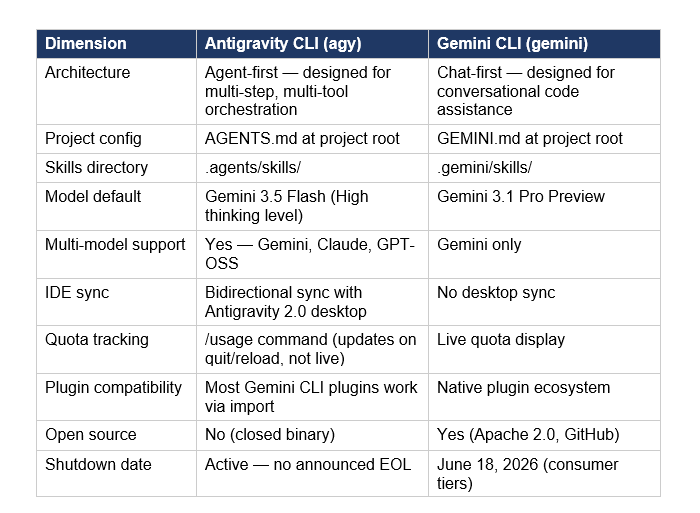
Antigravity CLI vs Gemini CLI
Here’s the practical difference:
- Gemini CLI = “smart terminal buddy”
- Antigravity CLI = “terminal front‑end to a full multi‑agent platform (Antigravity)”
They’re related, but aimed at different workflows.
!Relevant diagram or illustration related to the topic
1. What Gemini CLI is
Gemini CLI is a terminal-only interface to Gemini models and “agentic” tasks. It runs in any shell and talks directly to Google’s Gemini backend via API keys. [^3dk98a]
Key characteristics: [^3dk98a]dk98a] [^pfzh03]
- Text / terminal focused
- Run commands like
gemini chat,gemini code,gemini run, etc., in a regular terminal. - Single-agent, request–response feel
- You usually drive it: “refactor this file”, “explain this log”, “summarize this doc.”
- Configurable via files and env vars
settings.jsonfor context files, model parameters, etc. [^dwr94q].env/ env vars for system instructions likeGEMINI_SYSTEM_MD. [^dwr94q]- Headless-friendly
- Works over SSH, in CI, on servers—no GUI required. [^pfzh03]
- Status / lifecycle
- It’s being sunset as the primary product for most users in favor of Antigravity/Antigravity CLI. [^3dk98a]
- After June 18, 2026, free/Pro usage via Gemini Code Assist will stop, but it will remain available for organizations with paid Gemini / Enterprise / Code Assist licenses via API keys. [^3dk98a]
Use it when you want a simple, scriptable, terminal-native AI tool and/or must run in environments without a GUI.
2. What Antigravity CLI is
Antigravity CLI is a newer, Go-based terminal client that connects to Google Antigravity, an “agent‑first” development platform with a unified backend and GUI IDE. [^3dk98a] [^pfzh03]
Key characteristics:1 [^pfzh03]
- Part of the Antigravity platform
- Shares the same server-side agent harness as the Antigravity desktop app (Antigravity 2.0). [^3dk98a]
- Same core agents across IDE and CLI.
- Multi‑agent orchestration
- Designed for workflows where multiple agents collaborate and run in the background (e.g., one refactors, another runs tests, another researches). [^3dk98a]
- Faster, more responsive
- Built in Go and optimized for speed. [^3dk98a]
- Asynchronous workflows
- Can spin off long‑running jobs (large refactors, multi-topic research) without “blocking” your terminal session. [^3dk98a]
- Future‑proof for Antigravity features
- As Antigravity’s core agents improve, CLI benefits automatically because they share backend architecture. [^3dk98a]
So Antigravity CLI is less “just a chat client” and more a terminal front door into a full agent system.
!Additional supporting visual content

3. When to use which?
Use Antigravity CLI if:
- You’re building on the Antigravity ecosystem
- You want the same agents in your IDE (Antigravity) and your terminal, with a unified backend. [^3dk98a] [^pfzh03]
- You care about agent orchestration, background tasks, and a consistent “multi-agent” experience.
- You want modern, multi‑agent workflows
- Run long refactors, codebase investigations, or research tasks as background agents, not just one-off prompts. [^3dk98a]
- Benefit from improvements in Antigravity core agents without changing your scripts.
- You’re just starting today
- Google’s own guidance: Antigravity is the primary, “premier” agent-first platform going forward. [^3dk98a]
- The official Cloud blog summary:
- Antigravity if you want a complete agent manager and IDE experience.
- Gemini CLI if you want a terminal CLI or need headless execution.[^pfzh03]
- Daily development with Antigravity on your machine, plus a CLI that talks to the same agents.
- Complex, multi-step jobs where agents can parallelize work (refactor + tests + docs).
- Teams adopting Antigravity as their main AI dev environment.
!Practical example or use case visualization
Use Gemini CLI if:
- You need a pure terminal/headless tool
- SSH into a server, use within Docker, or run in CI where Antigravity GUI isn’t available. [^pfzh03]
- Scriptable one-off tasks where loading a full agent platform is overkill.
- You rely on its configurability
- Auto-loading large context files via
settings.json. [^dwr94q] - Fine-grained control over model parameters per task. [^dwr94q]
- Custom system prompts via env vars (e.g.,
GEMINI_SYSTEM_MD). [^dwr94q]
- You’re on an enterprise setup already using Gemini CLI
- Organizations with Gemini Code Assist Standard/Enterprise or Gemini Code Assist for GitHub through Google Cloud keep full support (including latest Gemini models) even after June 18, 2026. [^3dk98a]
- For these orgs, Gemini CLI remains a supported, stable tool.
- DevOps/sre scripts calling
geminifor log analysis or config generation. - CI jobs that lint, rewrite, or document code via CLI.
- Developers on remote boxes who just want AI in a shell.
4. What if you’re already using Gemini CLI?
- For individuals / Pro users:
- Google is funneling energy into one unified platform: Antigravity + Antigravity CLI. [^3dk98a]
- If you’re not locked into Gemini CLI, it’s wise to migrate new workflows to Antigravity CLI.
- For organizations with enterprise licenses:
- Your Gemini CLI access and updates continue; you don’t have to switch. [^3dk98a]
- But new multi-agent features will likely appear first (and more naturally) in Antigravity.
5. Quick decision cheat sheet
- I want an AI‑powered IDE and multi-agent manager.
→ Use Antigravity (IDE) and Antigravity CLI. [^3dk98a] [^pfzh03]
- I need AI in scripts / CI / headless Linux boxes.
→ Use Gemini CLI (especially if you already have an enterprise Gemini license). [^pfzh03]
- I’m a new developer choosing today and mostly work locally.
→ Default to Antigravity + Antigravity CLI; it’s where future investment is going. [^3dk98a] [^pfzh03]
- I care deeply about custom system prompts and automatic huge context files and already wired them into
settings.jsonand.env.
→ You can stay with Gemini CLI where that’s stable, particularly in enterprise contexts, while evaluating how Antigravity CLI exposes similar controls. [^dwr94q]
Citations
[^3dk98a]: 2026, May 18. An important update: Transitioning Gemini CLI to Antigravity CLI. Published: 2026-05-19 | Updated: 2026-05-19
2: 2026, May 22. Google Antigravity vs. Gemini CLI: Which One Do You Need?. Published: 2025-11-22 | Updated: 2026-05-23
3: 2026, May 15. From Gemini CLI to Antigravity: Why Agent Manager is the Upgrade I .... Published: 2025-11-19 | Updated: 2026-05-16
[^pfzh03]: 2026, May 20. Choosing Antigravity or Gemini CLI | Google Cloud Blog. Published: 2026-02-04 | Updated: 2026-05-21
[^dwr94q]: 2026, May 19. Antigravity-cli vs geminic-cli - Google AI Developers Forum. Published: 2026-05-19 | Updated: 2026-05-20
Related in the catalogue
Visual Workspace for Claude Code & Codex
nimbalyst.comNimbalyst is the session manager and visual editor for markdown, mockups, drawings, sessions, and tasks. Maximize the bandwidth of your collaboration with your agents.

The Agent That Grows With You
hermes-agent.nousresearch.comAn open-source agent that grows with you. Install it, give it your messaging accounts, and it becomes a persistent personal agent.
Wonda.sh
wonda.shPlug Wonda into your agent to scrape, analyze, generate, edit, post — launch 10x more content on Instagram, TikTok, X, LinkedIn, and Reddit. In your voice, no slop.
Email for developers
resend.comThe best way to reach humans instead of spam folders. Deliver transactional and marketing emails at scale.